Professional High Quality Stage Lighting Manufacturer


Table of Contents
DMX Lighting system setup guide:
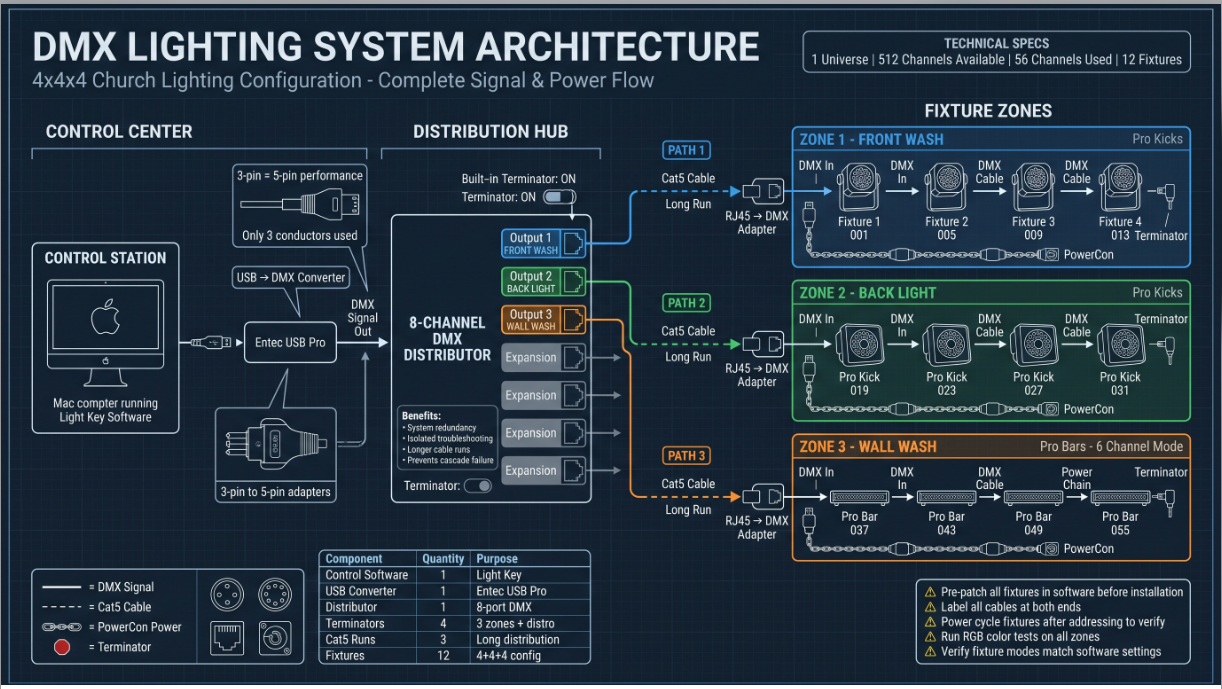
In this case,we have 4 fixtures as our front lighting,4 as our back light,4 as wall light on the floor.We will finally wire them up with the Powercon cable&dmx cable.
1. What Is Dmx Lighting?
Understanding the core technology of DMX lights
- DMX = Digital Multiplex protocol for light communication
- 1 Universe = 512 channels.If we need to expand into a second universe,say we have moving head stage lighting and effect lighting with a lot of attributes that are required to be adjusted,then we will open up another universe giving us more channels.If we get into a second universe,it is still 512 channels,but now they’re combined going to give us a t otal channel count of 1024.
- This setup uses only 60 of 512 available channels,see below detailed table.
- Each fixture needs a unique DMX address (It likes a phone number for each one)
| 4 Front lights | 4 Back lights | 4 Wall light |
| 4 fixtures 2 CH mode=8 | 4 fixtures 7 CH mode=28 | 4 fixtures 6 CH mode=24 |
2. How To Setup Control System
The signal chain from computer to lights:
- Mac Computer → USB Cable → USB Pro Converter → 5-pin to 3-pin turnaround → DMX Distributor.
- Light Key control software manages the system
- 3-pin vs 5-pin: There is no performance advantage of utilizing 5-pin setup.The majority of the fixtures in your setup using,it is 3-pin,so it is required to turn the signal around and going to 3-pin route.In the 5-pin setup,only three conductors are used anyway.
3. How To Do Signal Distribution
Why a DMX distributor is vital:
- Segments system into manageable zones
- Faster troubleshooting capability
- Prevents total system failure from single cable issue
- Use Cat5 cable for long runs (cheaper, easier to pull, equally robust)
With this distribution,what it allows to do is segment out our DMX setup so that we can creat a more organized setup.Without this in place,we would have to daisy chain each light device throughout the entire event.
4. How To Set Dmx Lighting Fixture Connection&Dmx Address?
Step-by-step wiring process:
- First fixture: Direct home run from distributor
- Subsequent fixtures: Daisy chain DMX output to next input
- PowerCon connectors for clean power distribution
- Terminator at last fixture acts like a stop sign
- Addressing: Pre-patch in software, print list, set addresses, verify by power cycling
5. How To Do System Testing&Optimization?
Final verification steps:
- Run color tests (red/blue/green) on all fixtures
- Verify DMX addresses and led lighting fixture modes
- Check all 4 terminators are installed (3 zones + distributor)
- Label all cables clearly
- Use high-quality cables to prevent flickering
📈 Setup System Summary
- 12 Total Fixtures (4+4+4 configuration)
- 60 Channels Used out of 512 available
- 3 Output Zones (Front Wash, Back Light, Wall Wash)
- 4 Terminators for signal integrity
Essentially, this stage lighting application here can apply to any size DMX system. The only difference is utilizing more outputs, adding more channels or universes on your control side of things, and just a lot of more cables and devices.Follow this workflow from planning through installation to testing to make sure everything is done well step by step.
In your final setup,once everything is completed,please make sure that we are operating in a extremely clean environment,there are two steps you should pay more attention.Firstly,check the DMX address,making sure every unit is connected,operating as intended;Secondly,check the fixture mode is correct based on the DMX setting that you have into editing in the lighting software,for example,if you have set it to a two-channel mode,meaning it is going to utilize two channels,but we also can make a little adjustment where the fixtures go in six-channel modes,we are not going to operate that mode in this setup,we are going to operate six-channel modes,therefore,we have to make sure the fixture mode is set there.